
 Ruibin_Ningh
前言
星度主题的瞬间插件适配已经等了很久了,但是最近买了Cursor Pro,那就让AI帮我折腾一下吧
效果
演示:瞬间 - 星尘客栈
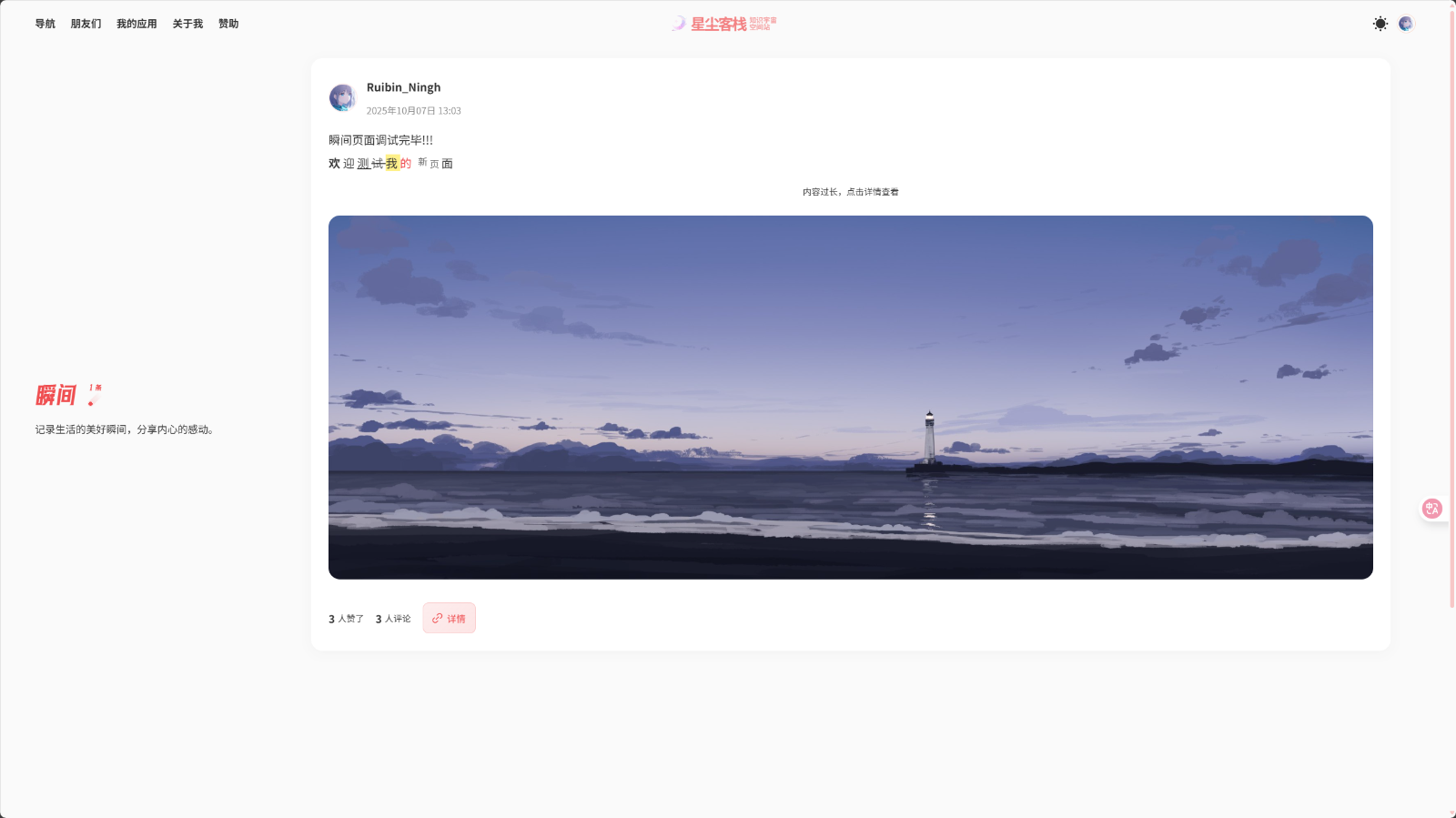
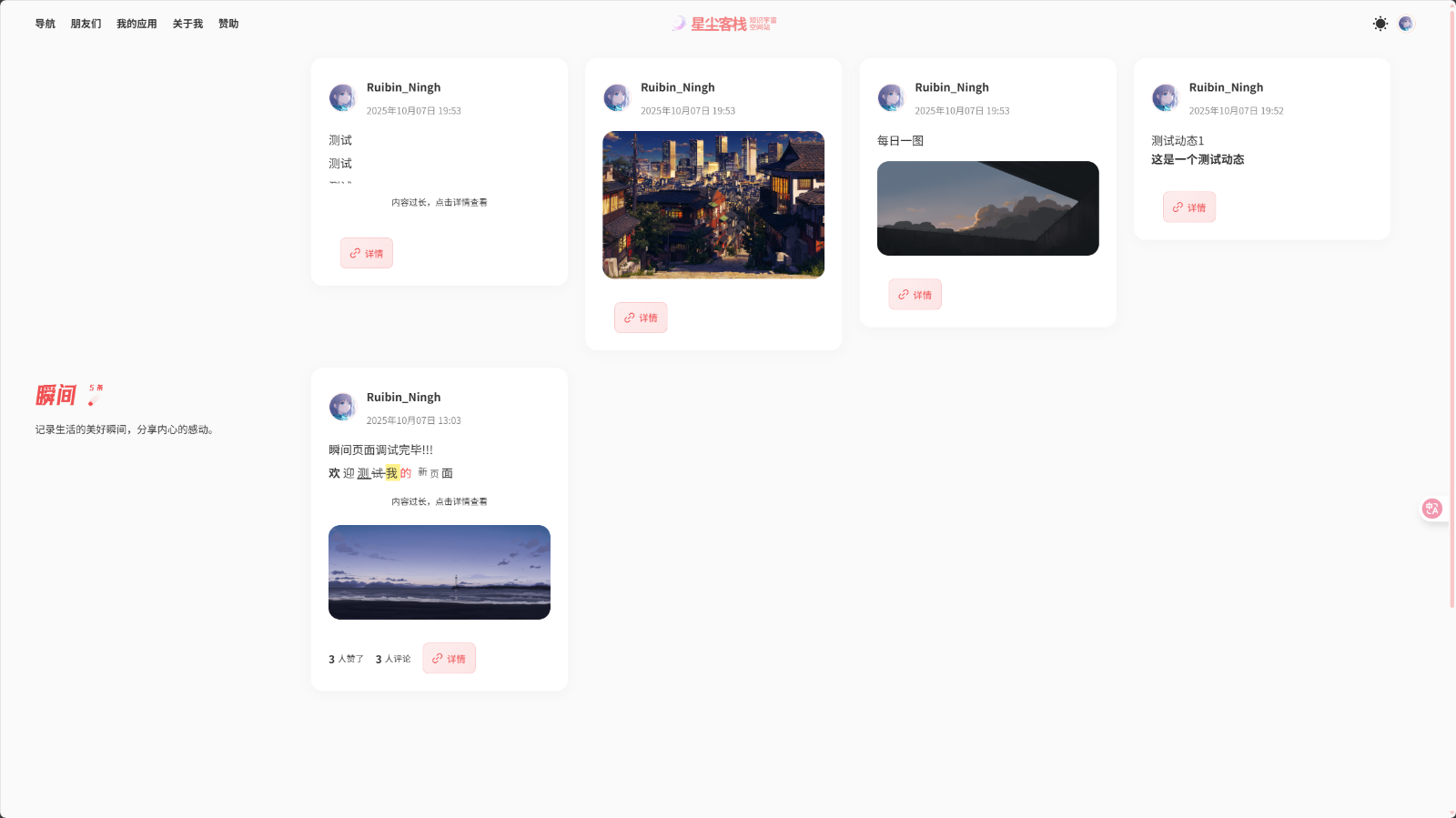
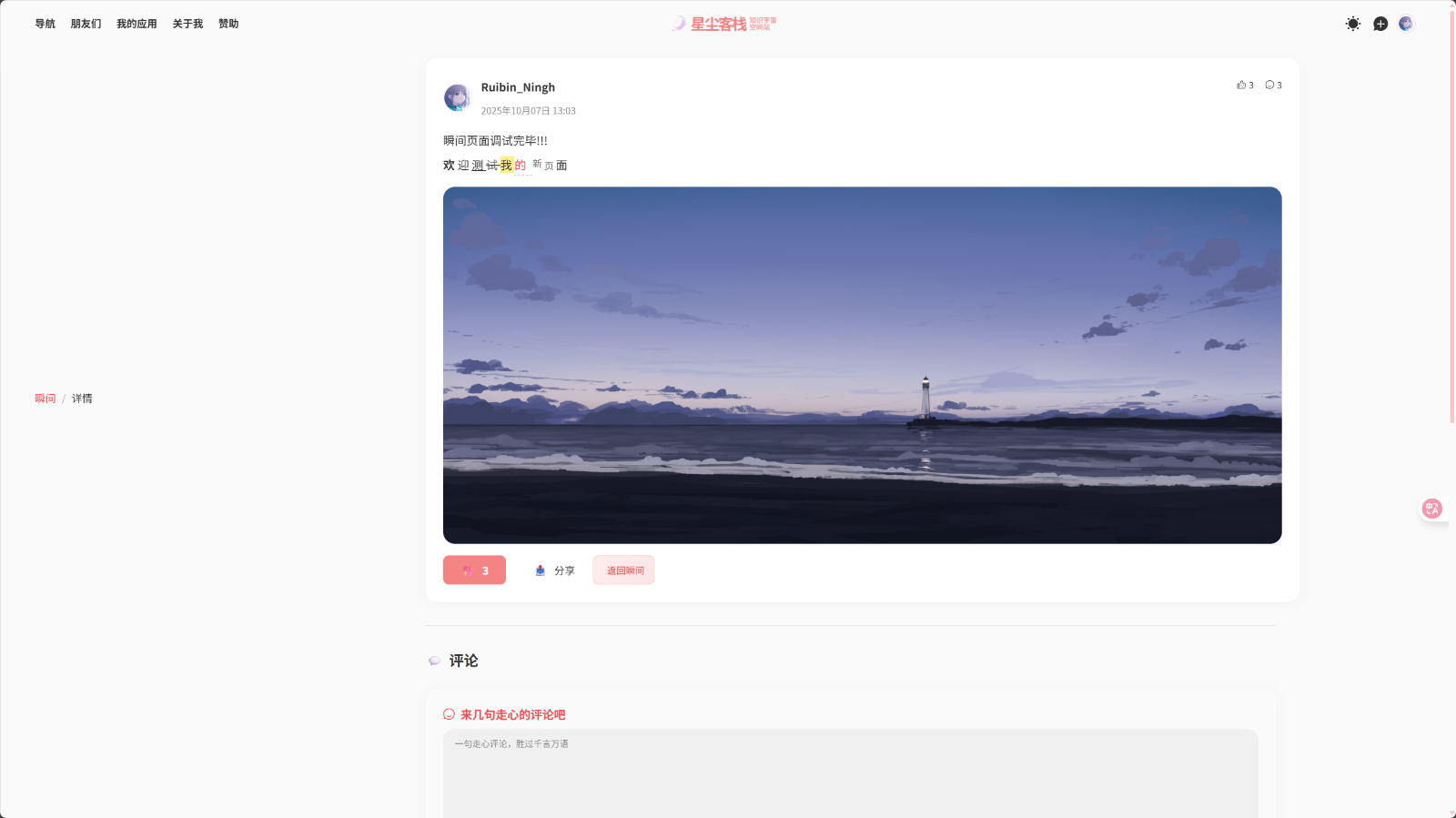
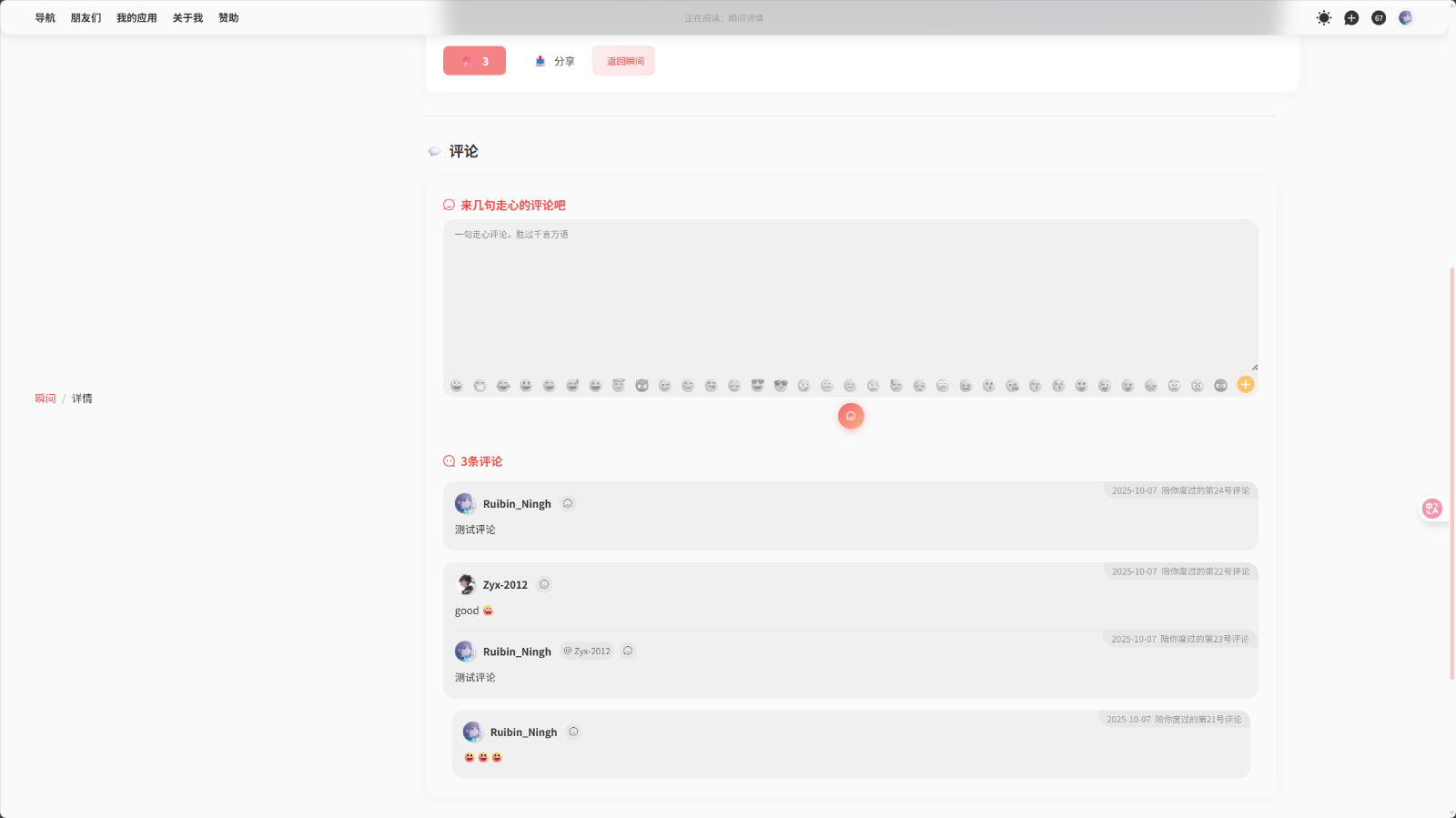
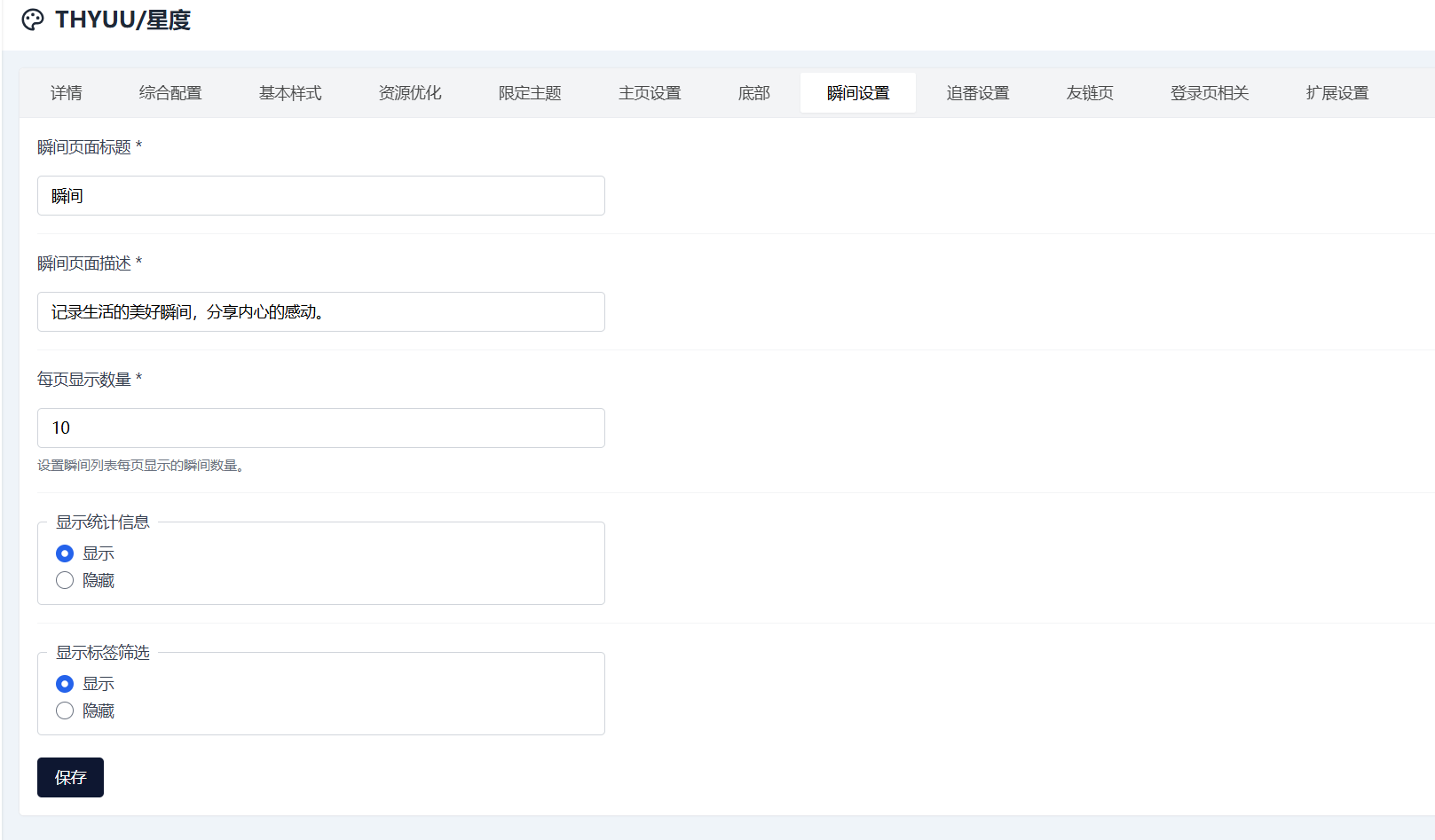
并且增添了一些配置
操作
比较累不想写太详细的教程,如果哪里跟不上可以询问AI
首先你的博客是星度主题且安装了瞬间插件
接下来获取你的主题文件,如果方便可以直接修改,当然如果你不方便或者不会可以通过下载备份的手段获取主题文件
打开主题目录
首先编辑setting.yaml文件,在最后面添加如下代码
    - group: moments
      label: 瞬间设置
      formSchema:
        - $formkit: text
          name: moments_title
          label: 瞬间页面标题
          value: "瞬间"
          validation: required
        - $formkit: text
          name: moments_description
          label: 瞬间页面描述
          value: "记录生活的美好瞬间,分享内心的感动。"
          validation: required
        - $formkit: number
          name: moments_per_page
          label: 每页显示数量
          value: 10
          min: 5
          max: 50
          help: 设置瞬间列表每页显示的瞬间数量。
          validation: required
        - $formkit: radio
          name: moments_show_stats
          label: 显示统计信息
          value: true
          options:
            - label: 显示
              value: true
            - label: 隐藏
              value: false
        - $formkit: radio
          name: moments_show_tags
          label: 显示标签筛选
          value: true
          options:
            - label: 显示
              value: true
            - label: 隐藏
value: false保存后在templates 目录新建文件moment.html 代码如下
<!DOCTYPE html>
<html xmlns:th="https://www.thymeleaf.org"
  th:replace="~{modules/layout :: layout(_title = '瞬间详情',menu_site_title = '正在阅读:瞬间详情',_content = ~{::content},
  _head = ~{::head},page_js = ~{::page_js}, body_class = 'page-template page-template-moment page wide-page')}">
<th:block th:fragment="head">
  <th:block th:replace="~{modules/page-css}" />
  <link rel="stylesheet" th:href="@{/assets/css/moments.css?v={version}(version=${theme.spec.version})}" type="text/css" media="all">
</th:block>
<th:block th:fragment="content">
  <main id="main" class="site-main" role="main">
    <header class="page-header">
      <div class="breadcrumb fade-before">
        <a th:href="@{/moments}">瞬间</a>
        <span class="separator">/</span>
        <span>详情</span>
      </div>
    </header>

    <article class="moment-detail">
      <div class="moment-item fade-before">
        <div class="moment-header">
          <div class="moment-author">
            <img th:if="${moment.owner != null && not #strings.isEmpty(moment.owner.avatar)}"
                 th:src="${moment.owner.avatar}"
                 th:alt="${moment.owner.displayName}"
                 class="author-avatar">
            <div class="author-info">
              <span class="author-name" th:text="${moment.owner != null ? moment.owner.displayName : '未知作者'}">作者</span>
              <time class="moment-time" th:datetime="${moment.spec.releaseTime}"
                    th:text="${moment.spec.releaseTime != null ? #dates.format(moment.spec.releaseTime, 'yyyy年MM月dd日 HH:mm') : '未知时间'}">时间</time>
            </div>
          </div>
          <div class="moment-stats" th:if="${theme.config.moments.moments_show_stats}">
            <span class="stat-item" th:if="${moment.stats != null && moment.stats.upvote > 0}">
              <i class="thyuu-iconfont thyuu-icon-like"></i>
              <span th:text="${moment.stats.upvote}">0</span>
            </span>
            <span class="stat-item" th:if="${moment.stats != null && moment.stats.totalComment > 0}">
              <i class="thyuu-iconfont thyuu-icon-pinglun"></i>
              <span th:text="${moment.stats.totalComment}">0</span>
            </span>
          </div>
        </div>

        <!-- 瞬间内容 -->
        <div class="moment-content" th:if="${moment.spec != null && moment.spec.content != null && not #strings.isEmpty(moment.spec.content.html)}">
          <div class="moment-text" th:utext="${moment.spec.content.html}"></div>
        </div>

        <!-- 媒体内容 -->
        <div class="moment-media" th:if="${moment.spec != null && moment.spec.content != null && not #lists.isEmpty(moment.spec.content.medium)}">
          <div class="media-grid" th:if="${#lists.size(moment.spec.content.medium) == 1}">
            <div class="media-item single" th:each="media : ${moment.spec.content.medium}">
              <img th:if="${media.type.toString() == 'PHOTO' or media.type.toString() == 'photo' or media.type.name() == 'PHOTO'}"
                   th:src="${media.url.startsWith('http') ? media.url : (media.url.startsWith('/upload') ? media.url : ('/upload' + media.url))}"
                   th:alt="瞬间图片"
                   class="media-image"
                   data-fancybox="moment-detail">
              <video th:if="${media.type.toString() == 'VIDEO' or media.type.toString() == 'video' or media.type.name() == 'VIDEO'}"
                     th:src="${media.url.startsWith('http') ? media.url : (media.url.startsWith('/upload') ? media.url : ('/upload' + media.url))}"
                     controls
                     preload="metadata"
                     class="media-video">
                <p>您的浏览器不支持视频播放。</p>
              </video>
              <audio th:if="${media.type.toString() == 'AUDIO' or media.type.toString() == 'audio' or media.type.name() == 'AUDIO'}"
                     th:src="${media.url.startsWith('http') ? media.url : (media.url.startsWith('/upload') ? media.url : ('/upload' + media.url))}"
                     controls
                     preload="metadata"
                     class="media-audio">
                <p>您的浏览器不支持音频播放。</p>
              </audio>
            </div>
          </div>
          <div class="media-grid multiple" th:if="${#lists.size(moment.spec.content.medium) > 1}">
            <div class="media-item" th:each="media : ${moment.spec.content.medium}">
              <img th:if="${media.type.toString() == 'PHOTO' or media.type.toString() == 'photo' or media.type.name() == 'PHOTO'}"
                   th:src="${media.url.startsWith('http') ? media.url : (media.url.startsWith('/upload') ? media.url : ('/upload' + media.url))}"
                   th:alt="瞬间图片"
                   class="media-image"
                   data-fancybox="moment-detail">
              <video th:if="${media.type.toString() == 'VIDEO' or media.type.toString() == 'video' or media.type.name() == 'VIDEO'}"
                     th:src="${media.url.startsWith('http') ? media.url : (media.url.startsWith('/upload') ? media.url : ('/upload' + media.url))}"
                     controls
                     preload="metadata"
                     class="media-video">
                <p>您的浏览器不支持视频播放。</p>
              </video>
              <audio th:if="${media.type.toString() == 'AUDIO' or media.type.toString() == 'audio' or media.type.name() == 'AUDIO'}"
                     th:src="${media.url.startsWith('http') ? media.url : (media.url.startsWith('/upload') ? media.url : ('/upload' + media.url))}"
                     controls
                     preload="metadata"
                     class="media-audio">
                <p>您的浏览器不支持音频播放。</p>
              </audio>
            </div>
          </div>
        </div>

        <!-- 标签 -->
        <div class="moment-tags" th:if="${moment.spec != null && not #lists.isEmpty(moment.spec.tags)}">
          <span class="tag" th:each="tag : ${moment.spec.tags}">
            <a th:href="|/moments?tag=${tag}|" th:text="${tag}">标签</a>
          </span>
        </div>

        <!-- 互动按钮和操作按钮 -->
        <div class="moment-actions">
          <div class="interaction-buttons">
            <button class="interaction-btn like-btn" th:data-moment-id="${moment.metadata.name}">
              <span class="like-icon">❤️</span>
              <span class="like-count" th:text="${moment.stats != null ? moment.stats.upvote : 0}">0</span>
            </button>
            <button class="interaction-btn share-btn" th:data-moment-id="${moment.metadata.name}">
              <span class="share-icon">📤</span>
              <span>分享</span>
            </button>
          </div>

          <a th:href="@{/moments}" class="action-link back-btn">
            <i class="thyuu-iconfont thyuu-icon-back"></i>
            <span>返回瞬间</span>
          </a>
        </div>
      </div>

      <!-- 评论区域 -->
      <div class="moment-comments fade-before">
        <h3 class="comments-title">评论</h3>
        <div class="comments-container">
          <!-- 集成Halo评论插件 -->
          <th:block th:replace="~{modules/widgets/comment :: comment(post_name=${moment.metadata.name},kind='Moment',group='moment.halo.run')}"></th:block>
        </div>
      </div>
    </article>
  </main>
</th:block>

<th:block th:fragment="page_js">
<script>
// 瞬间详情页面 - 最后执行的脚本(避免冲突)
console.log('🚀 瞬间详情页面脚本开始执行!');
console.log('当前时间:', new Date().toISOString());
console.log('页面URL:', window.location.href);
console.log('文档状态:', document.readyState);

// 优化:只等待DOM就绪,不等待所有资源
function waitForDOMReady() {
  return new Promise((resolve) => {
    if (document.readyState === 'interactive' || document.readyState === 'complete') {
      resolve();
    } else {
      document.addEventListener('DOMContentLoaded', resolve);
    }
  });
}

// 主要的按钮功能
function initMomentButtons() {
  console.log('🔍 开始初始化瞬间按钮...');

  const likeBtn = document.querySelector('.like-btn');
  const shareBtn = document.querySelector('.share-btn');

  console.log('点赞按钮:', likeBtn ? '✅ 找到' : '❌ 未找到');
  console.log('分享按钮:', shareBtn ? '✅ 找到' : '❌ 未找到');

  if (likeBtn) {
    // 移除可能存在的旧事件监听器
    const newLikeBtn = likeBtn.cloneNode(true);
    likeBtn.parentNode.replaceChild(newLikeBtn, likeBtn);

    newLikeBtn.addEventListener('click', function(e) {
      e.preventDefault();
      e.stopPropagation();
      console.log('🎯 点赞按钮被点击!');

      const momentId = this.getAttribute('data-moment-id');
      const likeCount = this.querySelector('.like-count');
      const likeIcon = this.querySelector('.like-icon');

      if (likeCount && likeIcon && momentId) {
        // 检查是否已经点赞过
        const wasLiked = this.classList.contains('liked');

        if (wasLiked) {
          console.log('❌ 已经点赞过了,不能重复点赞');
          return; // 已经点赞过,直接返回
        }

        // 更新UI状态(只支持点赞,不支持取消)
        this.classList.add('liked');
        let currentCount = parseInt(likeCount.textContent) || 0;
        likeCount.textContent = currentCount + 1;
        likeIcon.textContent = '💖';

        console.log(`点赞成功!数量: ${likeCount.textContent}`);

        // 保存点赞状态到localStorage
        saveLikeStatus(momentId, true);

        // 尝试提交到后端
        submitLikeToBackend(momentId);

        // 显示反馈
        showLikeFeedback(true);

        // 禁用按钮,防止重复点击
        this.style.pointerEvents = 'none';
        this.style.opacity = '0.7';
        console.log('✅ 点赞按钮已禁用,防止重复点赞');
      }
    });

    console.log('✅ 点赞按钮事件已绑定');
  }

  if (shareBtn) {
    // 移除可能存在的旧事件监听器
    const newShareBtn = shareBtn.cloneNode(true);
    shareBtn.parentNode.replaceChild(newShareBtn, shareBtn);

    newShareBtn.addEventListener('click', function(e) {
      e.preventDefault();
      e.stopPropagation();
      console.log('🎯 分享按钮被点击!');

      // 简单的分享功能
      const url = window.location.href;
      const title = document.title;

      if (navigator.share) {
        navigator.share({
          title: title,
          url: url
        }).then(() => {
          console.log('分享成功');
        }).catch((error) => {
          console.log('分享失败:', error);
          fallbackShare(url, title);
        });
      } else {
        fallbackShare(url, title);
      }
    });

    console.log('✅ 分享按钮事件已绑定');
  }
}

// 备用分享功能
function fallbackShare(url, title) {
  if (navigator.clipboard) {
    navigator.clipboard.writeText(url).then(() => {
      console.log('链接已复制到剪贴板');
      alert('链接已复制到剪贴板');
    });
  } else {
    const input = document.createElement('input');
    input.value = url;
    document.body.appendChild(input);
    input.select();
    document.execCommand('copy');
    document.body.removeChild(input);
    console.log('链接已复制到剪贴板(备用方法)');
    alert('链接已复制到剪贴板');
  }
}

// 点赞相关功能
function saveLikeStatus(momentId, isLiked) {
  try {
    const likes = JSON.parse(localStorage.getItem('moment-likes') || '{}');
    likes[momentId] = isLiked;
    localStorage.setItem('moment-likes', JSON.stringify(likes));
    console.log(`✅ 点赞状态已保存到localStorage: ${momentId} = ${isLiked}`);
  } catch (error) {
    console.error('❌ 保存点赞状态失败:', error);
  }
}

function getLikeStatus(momentId) {
  try {
    const likes = JSON.parse(localStorage.getItem('moment-likes') || '{}');
    return likes[momentId] || false;
  } catch (error) {
    console.error('❌ 获取点赞状态失败:', error);
    return false;
  }
}

function submitLikeToBackend(momentId) {
  // 只支持点赞,不支持取消点赞
  const apiEndpoints = [
    `/apis/api.halo.run/v1alpha1/trackers/upvote`
  ];

  const payload = {
    group: "moment.halo.run",
    plural: "moments",
    name: momentId
  };

  // 尝试每个端点
  apiEndpoints.forEach((endpoint, index) => {
    setTimeout(() => {
      // 只使用POST方法进行点赞
      fetch(endpoint, {
        method: 'POST',
        headers: {
          'Content-Type': 'application/json',
          'Accept': 'application/json',
          'X-Requested-With': 'XMLHttpRequest'
        },
        body: JSON.stringify(payload)
      })
      .then(response => {
        if (response.ok) {
          console.log(`✅ 点赞数据已提交到后端: ${endpoint}`);
          return response.json();
        } else {
          console.log(`⚠️ API端点不可用: ${endpoint} (${response.status})`);
          throw new Error(`HTTP ${response.status}`);
        }
      })
      .then(data => {
        console.log('📊 后端响应:', data);
        // 如果后端返回了新的点赞数,更新UI
        if (data && typeof data.upvote !== 'undefined') {
          const likeCount = document.querySelector('.like-count');
          if (likeCount) {
            likeCount.textContent = data.upvote;
            console.log(`🔄 从后端更新点赞数: ${data.upvote}`);
          }
        }
      })
      .catch(error => {
        console.log(`❌ API请求失败: ${endpoint}`, error.message);
      });
    }, index * 100); // 每个请求间隔100ms
  });
}

function showLikeFeedback(isLiked) {
  // 创建反馈提示
  const feedback = document.createElement('div');
  feedback.style.cssText = `
    position: fixed;
    top: 20px;
    right: 20px;
    background: ${isLiked ? '#4CAF50' : '#f44336'};
    color: white;
    padding: 12px 20px;
    border-radius: 8px;
    font-size: 14px;
    z-index: 10000;
    box-shadow: 0 4px 12px rgba(0,0,0,0.15);
    animation: slideIn 0.3s ease-out;
  `;

  feedback.textContent = isLiked ? '💖 已点赞' : '💔 已取消点赞';

  // 添加动画样式
  const style = document.createElement('style');
  style.textContent = `
    @keyframes slideIn {
      from { transform: translateX(100%); opacity: 0; }
      to { transform: translateX(0); opacity: 1; }
    }
  `;
  document.head.appendChild(style);

  document.body.appendChild(feedback);

  // 3秒后自动移除
  setTimeout(() => {
    feedback.style.animation = 'slideIn 0.3s ease-out reverse';
    setTimeout(() => {
      if (feedback.parentNode) {
        feedback.parentNode.removeChild(feedback);
      }
      if (style.parentNode) {
        style.parentNode.removeChild(style);
      }
    }, 300);
  }, 3000);
}

// 优化:从后端获取点赞数,HTML中已有初始值
function loadLikeCountFromBackend(momentId) {
  const endpoint = '/apis/api.halo.run/v1alpha1/trackers/upvote';
  const likeCount = document.querySelector('.like-count');

  // HTML中已经有初始值,直接异步获取最新数据
  fetch(endpoint, {
    method: 'GET',
    headers: {
      'Content-Type': 'application/json',
      'X-Requested-With': 'XMLHttpRequest'
    }
  })
  .then(response => {
    if (response.ok) {
      return response.json();
    } else {
      console.log(`⚠️ 获取点赞数失败: ${response.status}`);
      throw new Error(`HTTP ${response.status}`);
    }
  })
  .then(data => {
    console.log('📊 获取到的点赞数据:', data);

    // 查找当前瞬间的点赞数
    if (data && data.items) {
      const currentMomentTracker = data.items.find(item =>
        item.spec &&
        item.spec.group === 'moment.halo.run' &&
        item.spec.plural === 'moments' &&
        item.spec.name === momentId
      );

      if (currentMomentTracker && currentMomentTracker.spec.upvote !== undefined) {
        if (likeCount) {
          const currentValue = parseInt(likeCount.textContent) || 0;
          const newValue = currentMomentTracker.spec.upvote;

          // 只在数值不同时更新,避免不必要的DOM操作
          if (currentValue !== newValue) {
            likeCount.textContent = newValue;
            console.log(`✅ 更新点赞数: ${currentValue} → ${newValue}`);
          } else {
            console.log(`ℹ️ 点赞数无变化: ${newValue}`);
          }
        }
      } else {
        console.log('ℹ️ 未找到当前瞬间的点赞数据,保持HTML初始值');
      }
    }
  })
  .catch(error => {
    console.log(`❌ 获取点赞数失败:`, error.message);
    // 保持HTML中的初始值
  });
}

function loadLikeStatus(momentId) {
  const isLiked = getLikeStatus(momentId);
  const likeBtn = document.querySelector('.like-btn');

  if (likeBtn && isLiked) {
    likeBtn.classList.add('liked');
    const likeIcon = likeBtn.querySelector('.like-icon');
    if (likeIcon) {
      likeIcon.textContent = '💖';
    }

    // 禁用按钮,防止重复点赞
    likeBtn.style.pointerEvents = 'none';
    likeBtn.style.opacity = '0.7';

    console.log(`🔄 已加载点赞状态: ${momentId} = ${isLiked},按钮已禁用`);
  }
}

// 调试功能已移除

// 优化:主初始化函数,移除重复执行和调试开销
async function initMomentPage() {
  console.log('=== 开始初始化瞬间详情页面 ===');

  // 只等待DOM就绪,不等待所有资源
  await waitForDOMReady();
  console.log('✅ DOM已就绪');

  // 获取瞬间ID
  const momentId = document.querySelector('.like-btn')?.getAttribute('data-moment-id');
  console.log('瞬间ID:', momentId);

  // 初始化按钮
  initMomentButtons();

  // 加载保存的点赞状态和点赞数
  if (momentId) {
    loadLikeStatus(momentId);
    // 优化:立即显示初始值,异步获取最新数据
    loadLikeCountFromBackend(momentId);
  }

  // 延迟初始化(减少初始加载开销)
  setTimeout(() => {
    // 调试功能已移除
  }, 500);

  // 优化:使用事件委托处理图片错误,减少内存开销
  document.addEventListener('error', function(e) {
    if (e.target.classList.contains('media-image')) {
      console.warn('图片加载失败:', e.target.src);
      e.target.style.display = 'none';

      const placeholder = document.createElement('div');
      placeholder.className = 'image-placeholder';
      placeholder.innerHTML = `
        <div style="display: flex; flex-direction: column; align-items: center; justify-content: center;
                    height: 200px; background: #f5f5f5; border-radius: 8px; color: #666;">
          <i class="thyuu-iconfont thyuu-icon-image" style="font-size: 2rem; margin-bottom: 0.5rem;"></i>
          <span>图片加载失败</span>
        </div>
      `;
      e.target.parentNode.insertBefore(placeholder, e.target);
    }
  }, true);

  // 延迟初始化Fancybox(非关键功能)
  setTimeout(() => {
    if (typeof Fancybox !== 'undefined') {
      Fancybox.bind("[data-fancybox]", {
        Image: {
          zoom: true,
          click: "toggleZoom",
          wheel: "zoom",
          doubleClick: "zoom"
        }
      });
      console.log('✅ Fancybox已初始化');
    } else {
      console.warn('⚠️ Fancybox未加载');
    }
  }, 200);

  console.log('✅ 瞬间详情页面初始化完成');
}

// 测试评论API连接
function testCommentAPI() {
  const momentId = document.querySelector('.like-btn')?.getAttribute('data-moment-id');
  if (!momentId) {
    console.log('❌ 无法获取瞬间ID');
    return;
  }

  const commentAPI = `/apis/api.halo.run/v1alpha1/comments?kind=Moment&group=moment.halo.run&name=${momentId}`;
  console.log('🔍 测试评论API:', commentAPI);

  fetch(commentAPI, {
    method: 'GET',
    headers: {
      'Content-Type': 'application/json',
      'X-Requested-With': 'XMLHttpRequest'
    }
  })
  .then(response => {
    if (response.ok) {
      return response.json();
    } else {
      console.log(`⚠️ 评论API请求失败: ${response.status}`);
      throw new Error(`HTTP ${response.status}`);
    }
  })
  .then(data => {
    console.log('📊 评论API响应:', data);
    const commentCount = data.total || 0;
    console.log(`✅ 评论API连接正常,当前评论数: ${commentCount}`);
  })
  .catch(error => {
    console.log(`❌ 评论API连接失败:`, error.message);
  });
}

// 优化:只执行一次初始化
initMomentPage();

console.log('✅ 瞬间详情页面脚本加载完成');
</script>
</th:block>

</html>在同样目录下新建文件moments.html ,代码如下
<!DOCTYPE html>
<html xmlns:th="https://www.thymeleaf.org"
  th:replace="~{modules/layout :: layout(_title = '瞬间',menu_site_title = '正在阅读:瞬间',_content = ~{::content},
  _head = ~{::head},page_js = null, body_class = 'page-template page-template-moments page wide-page')}">
<th:block th:fragment="head">
  <th:block th:replace="~{modules/page-css}" />
  <link rel="stylesheet" th:href="@{/assets/css/moments.css?v={version}(version=${theme.spec.version})}" type="text/css" media="all">
</th:block>
<th:block th:fragment="content">
  <main id="main" class="site-main" role="main">
    <header class="page-header">
      <h1 class="page-title fade-before">
        <span th:text="${theme.config.moments.moments_title}">瞬间</span>
        <em class="num" th:utext="${moments.total + ' 条'}"></em>
      </h1>
      <div class="taxonomy-des fade-before">
        <p th:text="${theme.config.moments.moments_description}">记录生活的美好瞬间,分享内心的感动。</p>
      </div>
      <!-- 标签筛选 -->
      <nav class="taxonomy-nav fade-before" th:if="${not #lists.isEmpty(tags) && theme.config.moments.moments_show_tags}">
        <ul class="taxonomy-sub no-scrollbar">
          <li>
            <a th:href="@{/moments}" th:classappend="${#strings.isEmpty(param.tag)} ? 'active' : ''">全部</a>
          </li>
          <li th:each="tag : ${tags}">
            <a th:href="|/moments?tag=${tag.name}|"
               th:classappend="${#strings.equals(param.tag, tag.name)} ? 'active' : ''"
               th:text="${tag.name}">标签</a>
          </li>
        </ul>
      </nav>
    </header>

    <article class="moments-container page type-page hentry">
      <!-- 瞬间列表 -->
      <div class="moments-list" th:if="${moments != null && not #lists.isEmpty(moments.items)}">
        <div class="moment-item fade-before" th:each="moment : ${moments.items}">
          <div class="moment-header">
            <div class="moment-author">
              <img th:if="${not #strings.isEmpty(moment.owner.avatar)}"
                   th:src="${moment.owner.avatar}"
                   th:alt="${moment.owner.displayName}"
                   class="author-avatar">
              <div class="author-info">
                <span class="author-name" th:text="${moment.owner.displayName}">作者</span>
                <time class="moment-time" th:datetime="${moment.spec.releaseTime}"
                      th:text="${#dates.format(moment.spec.releaseTime, 'yyyy年MM月dd日 HH:mm')}">时间</time>
              </div>
            </div>
            </div>

          <!-- 瞬间内容 -->
          <div class="moment-content" th:if="${not #strings.isEmpty(moment.spec.content.html)}">
            <div class="moment-text-wrapper" th:classappend="${#strings.length(moment.spec.content.html) > 200 ? 'collapsed' : ''}">
              <div class="moment-text" th:utext="${moment.spec.content.html}"></div>
              <div class="content-hint" th:if="${#strings.length(moment.spec.content.html) > 200}">
                <span class="hint-text">内容过长,点击详情查看</span>
              </div>
            </div>
          </div>

          <!-- 媒体内容 -->

          <div class="moment-media" th:if="${moment.spec.content.medium != null and not #lists.isEmpty(moment.spec.content.medium)}">
            <div class="media-grid" th:if="${#lists.size(moment.spec.content.medium) == 1}">
              <div class="media-item single" th:each="media : ${moment.spec.content.medium}">
                <img th:if="${media.type.toString() == 'PHOTO' or media.type.toString() == 'photo' or media.type.name() == 'PHOTO'}"
                     th:src="${media.url.startsWith('http') ? media.url : (media.url.startsWith('/upload') ? media.url : ('/upload' + media.url))}"
                     th:alt="瞬间图片"
                     class="media-image"
                     data-fancybox="moment-[[${moment.metadata.name}]]">
                <video th:if="${media.type.toString() == 'VIDEO' or media.type.toString() == 'video' or media.type.name() == 'VIDEO'}"
                       th:src="${media.url.startsWith('http') ? media.url : (media.url.startsWith('/upload') ? media.url : ('/upload' + media.url))}"
                       controls
                       preload="none"
                       class="media-video">
                  <p>您的浏览器不支持视频播放。</p>
                </video>
                <audio th:if="${media.type.toString() == 'AUDIO' or media.type.toString() == 'audio' or media.type.name() == 'AUDIO'}"
                       th:src="${media.url.startsWith('http') ? media.url : (media.url.startsWith('/upload') ? media.url : ('/upload' + media.url))}"
                       controls
                       preload="none"
                       class="media-audio">
                  <p>您的浏览器不支持音频播放。</p>
                </audio>
              </div>
            </div>
            <div class="media-grid multiple" th:if="${#lists.size(moment.spec.content.medium) > 1}">
              <div class="media-item" th:each="media : ${moment.spec.content.medium}">
                <img th:if="${media.type.toString() == 'PHOTO' or media.type.toString() == 'photo' or media.type.name() == 'PHOTO'}"
                     th:src="${media.url.startsWith('http') ? media.url : (media.url.startsWith('/upload') ? media.url : ('/upload' + media.url))}"
                     th:alt="瞬间图片"
                     class="media-image"
                     data-fancybox="moment-[[${moment.metadata.name}]]">
                <video th:if="${media.type.toString() == 'VIDEO' or media.type.toString() == 'video' or media.type.name() == 'VIDEO'}"
                       th:src="${media.url.startsWith('http') ? media.url : (media.url.startsWith('/upload') ? media.url : ('/upload' + media.url))}"
                       controls
                       preload="none"
                       class="media-video">
                  <p>您的浏览器不支持视频播放。</p>
                </video>
                <audio th:if="${media.type.toString() == 'AUDIO' or media.type.toString() == 'audio' or media.type.name() == 'AUDIO'}"
                       th:src="${media.url.startsWith('http') ? media.url : (media.url.startsWith('/upload') ? media.url : ('/upload' + media.url))}"
                       controls
                       preload="none"
                       class="media-audio">
                  <p>您的浏览器不支持音频播放。</p>
                </audio>
              </div>
            </div>
          </div>

          <!-- 标签 -->
          <div class="moment-tags" th:if="${not #lists.isEmpty(moment.spec.tags)}">
            <span class="tag" th:each="tag : ${moment.spec.tags}">
              <a th:href="|/moments?tag=${tag}|" th:text="${tag}">标签</a>
            </span>
          </div>

          <!-- 底部信息栏 -->
          <div class="moment-footer">
            <!-- 统计信息和按钮并列 -->
            <div class="moment-footer-content">
              <!-- 统计信息 -->
              <div class="moment-stats" th:if="${theme.config.moments.moments_show_stats}">
                <span class="stat-item" th:if="${moment.stats != null && moment.stats.upvote > 0}">
                  <span class="stat-number" th:text="${moment.stats.upvote}">0</span>
                  <span class="stat-label">人赞了</span>
                </span>
                <span class="stat-item" th:if="${moment.stats != null && moment.stats.totalComment > 0}">
                  <span class="stat-number" th:text="${moment.stats.totalComment}">0</span>
                  <span class="stat-label">人评论</span>
                </span>
              </div>

              <!-- 详情按钮 -->
              <div class="moment-actions">
                <a th:href="@{/moments/{name}(name=${moment.metadata.name})}" class="action-link">
                  <i class="thyuu-iconfont thyuu-icon-link"></i>
                  <span>详情</span>
                </a>
              </div>
            </div>
          </div>
        </div>
      </div>

      <!-- 空状态 -->
      <div class="moments-empty fade-before" th:if="${moments == null || #lists.isEmpty(moments.items)}">
        <div class="empty-content">
          <i class="thyuu-iconfont thyuu-icon-moment empty-icon"></i>
          <h3>暂无瞬间</h3>
          <p>还没有发布任何瞬间,快去发布第一条吧!</p>
        </div>
      </div>
    </article>

    <!-- 分页 -->
    <th:block th:if="${moments != null}" th:replace="~{modules/widgets/pagination :: page('/moments',${moments})}"></th:block>
  </main>
</th:block>

<script>
// 移动端触摸增强
document.addEventListener('DOMContentLoaded', function() {
  // 检测是否为触摸设备
  const isTouchDevice = 'ontouchstart' in window || navigator.maxTouchPoints > 0;

  if (isTouchDevice) {
    const cards = document.querySelectorAll('.moment-item');

    cards.forEach(card => {
      let touchStartTime = 0;

      card.addEventListener('touchstart', function(e) {
        touchStartTime = Date.now();
        this.classList.add('touch-active');
      });

      card.addEventListener('touchend', function(e) {
        const touchDuration = Date.now() - touchStartTime;

        // 如果触摸时间超过200ms,显示按钮
        if (touchDuration > 200) {
          this.classList.add('touch-active');

          // 3秒后自动隐藏
          setTimeout(() => {
            this.classList.remove('touch-active');
          }, 3000);
        } else {
          this.classList.remove('touch-active');
        }
      });

      card.addEventListener('touchcancel', function(e) {
        this.classList.remove('touch-active');
      });
    });
  }

  // 处理图片加载错误
  const images = document.querySelectorAll('.media-image');
  images.forEach(img => {
    img.addEventListener('error', function() {
      console.warn('图片加载失败:', this.src);
      this.style.display = 'none';

      // 创建错误提示元素
      const errorDiv = document.createElement('div');
      errorDiv.className = 'image-error';
      errorDiv.style.cssText = `
        position: absolute;
        top: 50%;
        left: 50%;
        transform: translate(-50%, -50%);
        color: hsl(var(--thyuu--color-font) / 0.6);
        font-size: 0.875rem;
        text-align: center;
        padding: 1rem;
        background: hsl(var(--thyuu--color-font) / 0.05);
        border-radius: var(--thyuu--size-radius);
        border: 1px dashed hsl(var(--thyuu--color-font) / 0.2);
      `;
      errorDiv.textContent = '图片加载失败';

      // 插入到父容器中
      const parent = this.parentElement;
      if (parent) {
        parent.style.position = 'relative';
        parent.appendChild(errorDiv);
      }
    });

    img.addEventListener('load', function() {
      console.log('图片加载成功:', this.src);
    });
  });

  // 初始化Fancybox
  if (typeof Fancybox !== 'undefined') {
    Fancybox.bind("[data-fancybox]", {
      // 图片组配置
      groupAll: false,
      // 工具栏配置
      Toolbar: {
        display: {
          left: ["infobar"],
          middle: ["zoomIn", "zoomOut", "toggle1to1", "rotateCCW", "rotateCW", "flipX", "flipY"],
          right: ["slideshow", "thumbs", "close"]
        }
      },
      // 缩略图配置
      Thumbs: {
        autoStart: false
      },
      // 图片配置
      Image: {
        zoom: true,
        click: "toggleZoom",
        wheel: "zoom",
        doubleClick: "zoom"
      }
    });
  } else {
    console.warn('Fancybox未加载,图片预览功能可能不可用');
  }
});
</script>


</html>
在主题目录\templates\assets\css 下创建文件moments.css ,内容如下
@charset "utf-8";

/* =瞬间页面样式
-------------------------------------------------------------- */

/* 瞬间列表容器 */
.moments-container {
  max-width: 95% !important;
  width: 95% !important;
  margin: 0 auto;
  padding: 0 1rem;
}

/* 覆盖主题的内容宽度限制 */
.page-template-moments .moments-container {
  max-width: 95% !important;
  width: 95% !important;
}

/* 确保瞬间页面不受内容宽度限制 */
.page-template-moments .site-main > .moments-container {
  max-width: 95% !important;
  width: 95% !important;
}

/* 强制覆盖所有可能的内容宽度限制 */
.page-template-moments .moments-container,
.page-template-moments .site-main .moments-container,
body.page-template-moments .moments-container {
  max-width: 95% !important;
  width: 95% !important;
  margin-left: auto !important;
  margin-right: auto !important;
}

/* 网格布局优化 */
.moments-list {
  display: grid;
  grid-template-columns: repeat(auto-fit, minmax(300px, 1fr));
  gap: 1.5rem;
  align-items: start;
  justify-items: stretch;
  margin-bottom: 2rem;
}

/* 瞬间项目 */
.moment-item {
  background: var(--thyuu--color-back-white);
  border-radius: var(--thyuu--size-radius);
  box-shadow: var(--thyuu--shadow-white);
  padding: 1.5rem;
  transition: all 0.3s ease;
  position: relative;
  overflow: hidden;
  display: flex;
  flex-direction: column;
  height: fit-content;
  min-height: 200px;
}

.moment-item:hover {
  box-shadow: var(--thyuu--shadow-normal);
  /* 删除hover动画,避免鼠标卡住 */
}


/* 瞬间头部 */
.moment-header {
  display: flex;
  justify-content: space-between;
  align-items: flex-start;
  margin-bottom: 1rem;
}

.moment-author {
  display: flex;
  align-items: center;
  gap: 0.75rem;
}

.author-avatar {
  width: 2.5rem;
  height: 2.5rem;
  border-radius: 50%;
  object-fit: cover;
  border: 2px solid hsl(var(--thyuu--main-color) / 0.1);
  transition: all 0.3s ease;
}

.moment-item:hover .author-avatar {
  border-color: hsl(var(--thyuu--main-color) / 0.3);
  /* 简化头像动画,避免鼠标卡住 */
  transform: none;
}

.author-info {
  display: flex;
  flex-direction: column;
  gap: 0.25rem;
}

.author-name {
  font-weight: 600;
  color: hsl(var(--thyuu--color-font));
  font-size: 0.95rem;
}

.moment-time {
  font-size: 0.8rem;
  color: hsl(var(--thyuu--color-font) / 0.6);
}

/* 底部信息栏布局 */
.moment-footer {
  display: flex;
  justify-content: space-between;
  align-items: center;
  padding-top: 1rem;
  margin-top: auto;
  border-top: 1px solid hsl(var(--thyuu--color-border));
}

/* 底部信息栏布局 */
.moment-footer-content {
  display: flex;
  justify-content: space-between;
  align-items: center;
  gap: 1rem;
}

/* 统计信息 - 新格式 */
.moment-stats {
  display: flex;
  gap: 1rem;
  align-items: center;
}

.stat-item {
  display: flex;
  align-items: center;
  gap: 0.25rem;
  font-size: 0.85rem;
}

.stat-number {
  font-weight: 600;
  color: hsl(var(--thyuu--main-color));
  font-size: 0.9rem;
}

.stat-label {
  color: hsl(var(--thyuu--color-font) / 0.6);
  font-weight: 400;
}

/* 瞬间内容 */
.moment-content {
  margin-bottom: 1rem;
}

.moment-text {
  line-height: 1.6;
  color: hsl(var(--thyuu--color-font));
  word-break: break-word;
}

.moment-text p {
  margin: 0 0 0.5rem 0;
}

.moment-text p:last-child {
  margin-bottom: 0;
}

/* 文本省略效果 - 优化版本 */
.moment-text-wrapper {
  position: relative;
}

.moment-text-wrapper.collapsed .moment-text {
  max-height: 4.5em; /* 约3行文字的高度 */
  overflow: hidden;
  display: -webkit-box;
  -webkit-line-clamp: 3;
  line-clamp: 3;
  -webkit-box-orient: vertical;
  word-break: break-word;
  line-height: 1.5;
  position: relative;
}

/* 渐变遮罩效果 */
.moment-text-wrapper.collapsed .moment-text::after {
  content: '';
  position: absolute;
  bottom: 0;
  left: 0;
  right: 0;
  height: 1.5em;
  background: linear-gradient(transparent, hsl(var(--thyuu--color-back-white)));
  pointer-events: none;
}

/* 内容提示样式 */
.content-hint {
  margin-top: 0.5rem;
  text-align: center;
}

.hint-text {
  display: inline-block;
  padding: 0.3rem 0.8rem;
  background: hsl(var(--thyuu--color-bg) / 0.8);
  color: hsl(var(--thyuu--color-text) / 0.7);
  border: 1px solid hsl(var(--thyuu--color-border));
  border-radius: 0.5rem;
  font-size: 0.75rem;
  font-weight: 400;
  backdrop-filter: blur(4px);
  transition: all 0.2s ease;
}

.hint-text:hover {
  background: hsl(var(--thyuu--color-bg) / 0.9);
  color: hsl(var(--thyuu--color-text) / 0.8);
  border-color: hsl(var(--thyuu--main-color) / 0.3);
}

/* 媒体内容 */
.moment-media {
  margin-bottom: 1rem;
}

.media-grid {
  display: grid;
  gap: 0.5rem;
  border-radius: var(--thyuu--size-radius);
  overflow: hidden;
}

.media-grid.single {
  grid-template-columns: 1fr;
}

.media-grid.multiple {
  grid-template-columns: repeat(auto-fit, minmax(150px, 1fr));
}

.media-item {
  position: relative;
  overflow: hidden;
  border-radius: var(--thyuu--size-radius);
  background: hsl(var(--thyuu--color-font) / 0.05);
}

.media-item.single {
  max-height: 500px;
}

.media-image {
  width: 100%;
  height: 100%;
  object-fit: cover;
  transition: transform 0.3s ease;
  cursor: pointer;
  display: block;
  background: hsl(var(--thyuu--color-font) / 0.05);
}

/* 图片加载失败时的样式 */
.media-image:not([src]),
.media-image[src=""],
.media-image[src*="undefined"],
.media-image[src*="null"] {
  background: hsl(var(--thyuu--color-font) / 0.1);
  position: relative;
}

.media-image:not([src]):after,
.media-image[src=""]:after,
.media-image[src*="undefined"]:after,
.media-image[src*="null"]:after {
  content: "图片加载失败";
  position: absolute;
  top: 50%;
  left: 50%;
  transform: translate(-50%, -50%);
  color: hsl(var(--thyuu--color-font) / 0.6);
  font-size: 0.875rem;
  text-align: center;
}


.media-video {
  width: 100%;
  height: auto;
  max-height: 400px;
  border-radius: var(--thyuu--size-radius);
}

.media-audio {
  width: 100%;
  height: 40px;
  border-radius: var(--thyuu--size-radius);
}

/* 标签 */
.moment-tags {
  display: flex;
  flex-wrap: wrap;
  gap: 0.5rem;
  margin-bottom: 1rem;
}

.tag {
  display: inline-block;
}

.tag a {
  display: inline-block;
  padding: 0.25rem 0.75rem;
  background: hsl(var(--thyuu--main-color) / 0.1);
  color: hsl(var(--thyuu--main-color));
  border-radius: 1rem;
  font-size: 0.8rem;
  text-decoration: none;
  transition: all 0.3s ease;
}

.tag a:hover {
  background: hsl(var(--thyuu--main-color) / 0.2);
  /* 简化标签动画,避免鼠标卡住 */
  transform: none;
}

/* 操作按钮 - 紧凑设计 */
.moment-actions {
  display: flex;
  align-items: center;
}

/* 互动按钮组 */
.interaction-buttons {
  display: flex;
  gap: 0.75rem;
  align-items: center;
}

/* 返回按钮样式调整 */
.back-btn {
  position: relative;
  display: flex;
  align-items: center;
  gap: 0.5rem;
  padding: 0.5rem 1rem;
  background: hsl(var(--thyuu--main-color) / 0.1);
  border-radius: var(--thyuu--size-radius);
  text-decoration: none;
  color: hsl(var(--thyuu--color-font));
  transition: all 0.3s ease;
  font-size: 0.9rem;
  overflow: hidden;
}

.back-btn::before {
  content: '';
  position: absolute;
  top: 0;
  left: -100%;
  width: 100%;
  height: 100%;
  background: linear-gradient(90deg,
    transparent,
    hsl(var(--thyuu--main-color) / 0.2),
    transparent);
  transition: left 0.8s ease-in-out;
}

.back-btn:hover::before {
  left: 100%;
}

.back-btn:hover {
  background: hsl(var(--thyuu--main-color) / 0.2);
  transform: translateY(-1px);
}


/* 操作按钮脉冲效果 */
.action-link {
  position: relative;
  display: inline-flex;
  align-items: center;
  gap: 0.4rem;
  padding: 0.4rem 0.8rem;
  background: linear-gradient(135deg,
    hsl(var(--thyuu--main-color) / 0.1) 0%,
    hsl(var(--thyuu--main-color) / 0.15) 100%);
  color: hsl(var(--thyuu--main-color));
  border: 1px solid hsl(var(--thyuu--main-color) / 0.2);
  border-radius: 0.5rem;
  text-decoration: none;
  font-size: 0.8rem;
  font-weight: 500;
  transition: all 0.3s cubic-bezier(0.4, 0, 0.2, 1);
  backdrop-filter: blur(10px);
  overflow: hidden;
}

.action-link::before {
  content: '';
  position: absolute;
  top: 0;
  left: -100%;
  width: 100%;
  height: 100%;
  background: linear-gradient(90deg,
    transparent,
    hsl(var(--thyuu--main-color) / 0.3),
    transparent);
  transition: left 0.6s ease-in-out;
}

.action-link:hover::before {
  left: 100%;
}

.action-link:hover {
  background: linear-gradient(135deg,
    hsl(var(--thyuu--main-color) / 0.2) 0%,
    hsl(var(--thyuu--main-color) / 0.3) 100%);
  border-color: hsl(var(--thyuu--main-color) / 0.4);
  box-shadow:
    0 2px 8px hsl(var(--thyuu--main-color) / 0.15),
    0 1px 4px hsl(var(--thyuu--main-color) / 0.1);
  transform: translateY(-1px);
}

.action-link i {
  font-size: 0.85rem;
  transition: transform 0.3s ease;
  position: relative;
  z-index: 1;
}

.action-link:hover i {
  transform: scale(1.1);
}

/* 按钮文字渐变效果 */
.action-link span {
  background: linear-gradient(135deg,
    hsl(var(--thyuu--main-color)) 0%,
    hsl(var(--thyuu--main-color) / 0.8) 100%);
  background-clip: text;
  -webkit-background-clip: text;
  -webkit-text-fill-color: transparent;
  transition: all 0.3s ease;
}

.action-link:hover span {
  background: linear-gradient(135deg,
    hsl(var(--thyuu--main-color)) 0%,
    hsl(var(--thyuu--main-color)) 100%);
  background-clip: text;
  -webkit-background-clip: text;
}

/* 简洁的焦点样式 - 轮廓线在按钮内部 */
.action-link:focus {
  outline: 2px solid hsl(var(--thyuu--main-color));
  outline-offset: -2px;
}

.action-link:focus-visible {
  outline: 2px solid hsl(var(--thyuu--main-color));
  outline-offset: -2px;
}

/* 空状态 */
.moments-empty {
  text-align: center;
  padding: 4rem 2rem;
}

.empty-content {
  display: flex;
  flex-direction: column;
  align-items: center;
  gap: 1rem;
}

.empty-icon {
  font-size: 4rem;
  color: hsl(var(--thyuu--color-font) / 0.3);
}

.empty-content h3 {
  font-size: 1.5rem;
  color: hsl(var(--thyuu--color-font) / 0.7);
  margin: 0;
}

.empty-content p {
  color: hsl(var(--thyuu--color-font) / 0.5);
  margin: 0;
}

/* 瞬间详情页 */
.moment-detail {
  max-width: 1000px;
  width: 1000px;
  margin: 0 auto;
  padding: 0 1rem;
}

.moment-detail .moment-item {
  margin-bottom: 2rem;
  width: 100%;
  min-width: 1000px;
}

/* 评论区域样式 - 统一版本 */
.moment-comments {
  margin-top: 2rem;
  padding-top: 2rem;
  border-top: 1px solid hsl(var(--thyuu--color-font) / 0.1);
  display: block !important;
  visibility: visible !important;
  opacity: 1 !important;
}

.comments-title {
  font-size: 1.25rem;
  font-weight: 600;
  color: hsl(var(--thyuu--color-font));
  margin-bottom: 1.5rem;
  display: flex;
  align-items: center;
  gap: 0.5rem;
}

.comments-title::before {
  content: "💬";
  font-size: 1.1rem;
}

.comments-container {
  background: hsl(var(--thyuu--color-back-white));
  border-radius: var(--thyuu--size-radius);
  padding: 1.5rem;
  box-shadow: var(--thyuu--shadow-white);
  display: block !important;
  visibility: visible !important;
  opacity: 1 !important;
}

/* 面包屑导航 */
.breadcrumb {
  display: flex;
  align-items: center;
  gap: 0.5rem;
  margin-bottom: 2rem;
  font-size: 0.9rem;
}

.breadcrumb a {
  color: hsl(var(--thyuu--main-color));
  text-decoration: none;
  transition: color 0.3s ease;
}

.breadcrumb a:hover {
  color: hsl(var(--thyuu--main-color) / 0.8);
}

.breadcrumb .separator {
  color: hsl(var(--thyuu--color-font) / 0.4);
}


.comments-placeholder {
  text-align: center;
  padding: 2rem;
  color: hsl(var(--thyuu--color-font) / 0.5);
}

/* 响应式设计 */
@media (min-width: 1600px) {
  .moments-container,
  .page-template-moments .moments-container,
  .page-template-moments .site-main > .moments-container {
    max-width: 98% !important;
    width: 98% !important;
  }

  .moment-detail {
    max-width: 1200px;
    width: 1200px;
  }

  .moment-detail .moment-item {
    min-width: 1200px;
  }

  .moments-list {
    grid-template-columns: repeat(auto-fit, minmax(320px, 1fr));
  }
}

@media (max-width: 1400px) {
  .moments-container,
  .page-template-moments .moments-container,
  .page-template-moments .site-main > .moments-container {
    max-width: 98% !important;
    width: 98% !important;
  }

  .moment-detail {
    max-width: 1000px;
    width: 1000px;
  }

  .moment-detail .moment-item {
    min-width: 1000px;
  }

  .moments-list {
    grid-template-columns: repeat(auto-fit, minmax(280px, 1fr));
  }
}

@media (max-width: 1200px) {
  .moments-container,
  .page-template-moments .moments-container,
  .page-template-moments .site-main > .moments-container {
    max-width: 98% !important;
    width: 98% !important;
  }

  .moment-detail {
    max-width: 900px;
    width: 900px;
  }

  .moment-detail .moment-item {
    min-width: 900px;
  }

  .moments-list {
    grid-template-columns: repeat(auto-fit, minmax(260px, 1fr));
  }
}

@media (max-width: 768px) {
  .moments-container,
  .page-template-moments .moments-container,
  .page-template-moments .site-main > .moments-container {
    max-width: 100% !important;
    width: 100% !important;
    padding: 0 0.5rem;
  }

  .moment-detail {
    max-width: 100%;
    width: 100%;
    padding: 0 0.5rem;
  }

  .moment-detail .moment-item {
    min-width: auto;
    width: 100%;
  }

  .moments-list {
    grid-template-columns: 1fr;
    gap: 1rem;
  }

  .moment-item {
    padding: 1rem;
  }

  .moment-header {
    flex-direction: column;
    gap: 0.5rem;
  }

  .moment-footer-content {
    flex-direction: column;
    align-items: flex-start;
    gap: 0.75rem;
  }

  .moment-stats {
    align-self: flex-start;
  }

  .media-grid.multiple {
    grid-template-columns: repeat(auto-fit, minmax(120px, 1fr));
  }

  .moment-footer {
    flex-direction: column;
    gap: 0.75rem;
    align-items: stretch;
  }

  .moment-stats {
    justify-content: center;
    text-align: center;
  }

  .moment-actions {
    justify-content: center;
    padding-top: 0;
    opacity: 1 !important;
    transform: translateY(0);
    display: flex !important;
    visibility: visible !important;
  }

  .interaction-buttons {
    display: flex !important;
    gap: 0.5rem;
    opacity: 1 !important;
    visibility: visible !important;
  }

  .back-btn {
    padding: 0.5rem 1rem;
    font-size: 0.85rem;
    opacity: 1 !important;
    visibility: visible !important;
  }

  .action-link {
    padding: 0.4rem 0.8rem;
    font-size: 0.8rem;
    gap: 0.4rem;
  }

  .action-link i {
    font-size: 0.8rem;
  }

  /* 移动端:按钮始终显示 */
  .moment-item:active .moment-actions,
  .moment-item.touch-active .moment-actions {
    opacity: 1 !important;
    transform: translateY(0);
  }
}

@media (max-width: 1024px) {
  .moments-list {
    grid-template-columns: repeat(auto-fit, minmax(300px, 1fr));
  }
}

@media (max-width: 480px) {
  .media-grid.multiple {
    grid-template-columns: 1fr 1fr;
  }

  .moment-tags {
    justify-content: center;
  }

  .empty-content h3 {
    font-size: 1.2rem;
  }

  .empty-icon {
    font-size: 3rem;
  }

  /* 移动端按钮优化 */
  .action-link {
    padding: 0.4rem 0.8rem;
    font-size: 0.8rem;
    gap: 0.4rem;
  }

  .action-link i {
    font-size: 0.8rem;
  }

  /* 移动端简洁焦点样式 - 轮廓线在按钮内部 */
  .action-link:focus {
    outline-offset: -1px;
  }

  .action-link:focus-visible {
    outline-offset: -1px;
  }

  /* 移动端文本省略适配 */
  .moment-text-wrapper.collapsed .moment-text {
    max-height: 3.2em; /* 移动端显示更少行数 */
    -webkit-line-clamp: 2;
    line-clamp: 2;
  }

  .moment-text-wrapper.collapsed .moment-text::after {
    height: 1em;
  }

  /* 移动端提示样式适配 */
  .hint-text {
    padding: 0.25rem 0.6rem;
    font-size: 0.7rem;
  }
}

/* 动画效果 - 优化版本 */
/* fadeInUp动画已删除 - 避免鼠标卡住问题 */

/* 动画效果已删除 - 避免鼠标卡住问题 */

/* 为偏好减少动画的用户提供即时显示 */
@media (prefers-reduced-motion: reduce) {
  .moments-container .fade-before,
  .moments-container .moment-item.fade-before {
    animation: none !important;
    opacity: 1 !important;
    transform: none !important;
  }
}

/* 移动端优化 */
@media (max-width: 768px) {
  .moments-container .fade-before,
  .moments-container .moment-item.fade-before {
    animation-duration: 0.2s;
  }
}

/* 标签导航激活状态 */
.taxonomy-nav .taxonomy-sub li a.active {
  background: hsl(var(--thyuu--main-color));
  color: white;
}


.comments-placeholder {
  text-align: center;
  padding: 2rem;
  color: var(--text-secondary);
}

.comments-placeholder p {
  margin: 0;
  font-size: 0.9rem;
}

/* 互动按钮 */
.moment-interactions {
  display: flex;
  gap: 1rem;
  margin: 1.5rem 0;
  padding: 1rem 0;
  border-top: 1px solid var(--border-color);
  border-bottom: 1px solid var(--border-color);
}

.interaction-btn {
  display: flex;
  align-items: center;
  gap: 0.5rem;
  padding: 0.75rem 1.5rem;
  background: var(--card-bg);
  border: 1px solid var(--border-color);
  border-radius: 8px;
  color: var(--text-color);
  font-size: 0.9rem;
  cursor: pointer;
  transition: all 0.2s ease;
  text-decoration: none;
}

.interaction-btn:hover {
  background: var(--bg-color);
  border-color: hsl(var(--thyuu--main-color));
  color: hsl(var(--thyuu--main-color));
  /* 删除hover动画,避免鼠标卡住 */
}

.interaction-btn i,
.interaction-btn .like-icon,
.interaction-btn .share-icon,
.interaction-btn .bookmark-icon {
  font-size: 1rem;
}

.like-btn.liked {
  background: hsl(var(--thyuu--main-color));
  color: white;
  border-color: hsl(var(--thyuu--main-color));
}

.like-btn.liked:hover {
  background: hsl(var(--thyuu--main-color) / 0.8);
}

.like-count {
  font-weight: 600;
}

/* 移动端互动按钮优化 */
@media (max-width: 768px) {
  .moment-interactions {
    gap: 0.75rem;
    margin: 1rem 0;
    padding: 0.75rem 0;
    display: flex !important;
    justify-content: center;
    align-items: center;
    opacity: 1 !important;
    visibility: visible !important;
  }

  .interaction-btn {
    padding: 0.75rem 1.25rem;
    font-size: 0.9rem;
    min-width: 60px;
    min-height: 44px;
    display: flex !important;
    align-items: center;
    justify-content: center;
    flex-direction: column;
    gap: 0.25rem;
    opacity: 1 !important;
    visibility: visible !important;
  }

  .interaction-btn span {
    display: block !important;
    font-size: 0.75rem;
  }

  .interaction-btn i,
  .interaction-btn .like-icon,
  .interaction-btn .share-icon,
  .interaction-btn .bookmark-icon {
    font-size: 1.2rem;
    display: block !important;
  }
}

/* 安卓设备特殊优化 */
@media (max-width: 480px) {
  .moment-interactions {
    gap: 1rem;
    padding: 1rem 0;
    display: flex !important;
    opacity: 1 !important;
    visibility: visible !important;
  }

  .interaction-btn {
    padding: 1rem 1.5rem;
    min-width: 70px;
    min-height: 50px;
    font-size: 1rem;
    display: flex !important;
    opacity: 1 !important;
    visibility: visible !important;
  }

  .interaction-btn i,
  .interaction-btn .like-icon,
  .interaction-btn .share-icon,
  .interaction-btn .bookmark-icon {
    font-size: 1.3rem;
    display: block !important;
  }

  .interaction-btn span {
    font-size: 0.8rem;
    display: block !important;
  }
}

.taxonomy-nav .taxonomy-sub li a {
  padding: 0.5rem 1rem;
  border-radius: var(--thyuu--size-radius);
  text-decoration: none;
  color: hsl(var(--thyuu--color-font) / 0.7);
  transition: all 0.3s ease;
}

.taxonomy-nav .taxonomy-sub li a:hover {
  background: hsl(var(--thyuu--main-color) / 0.1);
  color: hsl(var(--thyuu--main-color));
}
然后修改完后保存,压缩回zip上传备份
在/moments 页面你就可以看到瞬间页面了
成功了记得留个评论,然后订阅我的文章QAQ